FeaturesGamesUse CasesPricingContact Us

Trivia. your questions, your room.

Write the questions yourself, then host them live. Tap one answer, tap several, or type it out. There is no Neegma question bank, and that is deliberate.

A pub quiz, except the questions are about your company, your wedding, or your neighbourhood, and the answer sheets mark themselves. Nobody prints anything.

2 to 200 players·Free for up to 10 players·In the room or over a call
Question 7 of 150:14

Which of these are core basic human tastes?

  • Umami
  • Spicy
  • Sour
  • Metallic

Tap every answer that applies, then submit.

18 of 24 answers in

What actually happens

The questions are yours, so the room leans in.

Trivia starts in the Playground. There is no house question bank to fall back on, which is the whole point. You write every question and choose how it gets answered: one right option, several right options, or free text that gets graded on what people type.

On the night, each question lands on every phone at once. The clock starts, answers come in, and the fastest correct ones take the most points. The board reshuffles before the next question loads.

Because the set is about your company, your wedding, or your community, it stops being a generic quiz and starts being about the people in the room. That is the difference between a polite nod and a table shouting at each other.

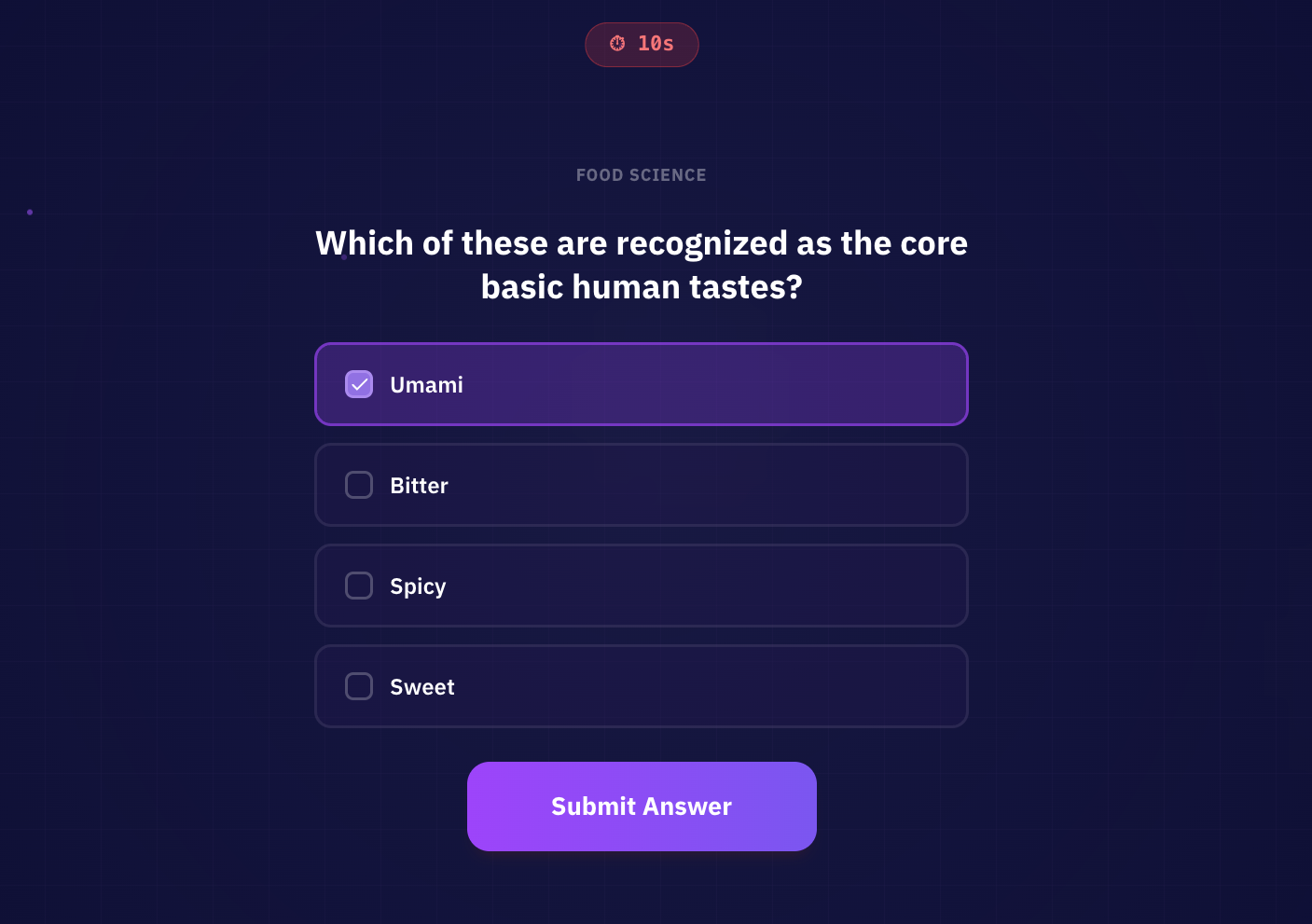
A multiple choice Trivia question on a player's phone, with Umami selected among the core basic human tastes.
A multiple choice question on a player's phone. Tap every answer that applies, then submit before the timer runs out.

The rules

How Trivia actually plays.

How to play

  1. 1

    Build a Trivia question set in the Playground, then choose it when you host.

  2. 2

    Everyone sees the same question. Select one option, select every correct option, or type an answer as instructed.

  3. 3

    Submit before the timer ends.

  4. 4

    Review the correct answer and updated leaderboard before the next question.

How to win

Fully correct answers earn 500 to 1,000 points depending on speed. There is no partial credit. The highest total across all questions wins.

What makes it work

  • Powered entirely by your own custom questions

  • Three answer styles

    Single choice, multiple choice, and free text

  • Speed-based scoring

    The faster you answer, the more points you earn

  • Live leaderboard visible to all players between rounds

  • Everyone answers on their own device

While you host

Run the quiz your way.

Choose how typed answers look, keep questions visible and give each reveal the time it needs.

Leaderboard

After question 7 of 15

  • 1T4Table 41st place6,050
  • 2T2Table 22nd place5,600
  • 3T7Table 73rd place5,200
Example team scores during a quiz

Example final podium

Table 4 wins

Table 2

11,950

2

Table 4

12,800

1

Table 7

10,400

3

Example team scores

Choose how typed answers look

For typed questions, choose Free Text for unaided recall or Letter boxes to show the answer's shape. Choice questions keep their selectable options in either setting.

Questions on screen, answers on phones

The host view carries the question and countdown while players choose or type on their devices. Their submitted answers stay off the shared prompt until the round is over.

Debrief before the next question

Switch to Manual when a question deserves discussion. During the answer reveal, open View submissions to compare responses, then show the leaderboard or continue when you are ready.

Give every quiz player a clear view

In the room

Put the host view on a screen facing the tables. Explain that some questions need one choice, some several, and others a typed answer.

On a video call

Share the host view and add the join link to chat. Players can read and answer each question on their own devices.

With a hybrid group

Wait for everyone to join the game before starting. Use the on-device question as the reference for both remote players and people in the room.

Use cases

Write a quiz around your people

Choose the questions and answer formats for the occasion.

  • Weddings

    How well do you know the couple?

    Ask where they met, their favourite meal or which holidays they have taken together. Mix a typed destination with single-choice questions and a select-all round. Plausible options give guests a way to guess, while tables can compare memories before submitting their answer.

    Games for weddings
  • Teams & onboarding

    Put company knowledge to the test

    Build questions around product launches, company history or people on the team. Start with single-choice questions that help new joiners take part, add a select-all round for the trickier topics, then use typed questions for a recall challenge. The reveal gives you a moment to explain the story behind an answer.

    Games for teams
  • Pubs & quiz nights

    Give your regulars a new question

    Create a set about food, films or local history and let tables discuss each question before their lead submits. Mix single-choice, select-all and typed questions to vary the challenge. Neegma marks the responses and updates the standings, leaving you free to read questions and host the room.

    Games for pub quizzes

Build a set around your subject, guests or occasion in the Playground.

Customise Trivia

Ways to play

Give everyone a score or bring the tables together.

The same question set works for individual players and teams.

Individual play

Everyone answers

Players submit on their own devices and build individual scores. Each question can use a different answer format.

Best for

Remote quizzes and individual challenges.

Team play

Discuss before you submit

Teams agree on an answer and the team lead submits it. The host can also let other members answer for the team.

Best for

Pub quiz tables and group celebrations.

Before you start

Trivia questions

Do multiple-choice questions give partial credit?
No. Players must select all the correct options and no incorrect ones. The order of selection does not matter.
How are typed answers checked?
Typed answers must match an accepted answer. Capitalisation and spaces at the start or end are ignored, but spelling and punctuation still matter.
Can typed answers show letter boxes?
Yes. The Letter boxes setting supports answers with up to 18 letters or digits. Spaces and punctuation are already in place. Longer answers use the standard text field.
How do players join?
Start a session and share its link or QR code. Players open it in their browser, enter a name and join you in the lobby. They don't need an account or an app. The joining guide covers team selection and what guests see next.
Can I use my own questions?
Yes. Trivia requires a question set before hosting. Create your own in the Playground by typing questions or importing a spreadsheet, then save it for another class, team or event. You can also start with a session template that already includes a set, including available Neegma sets.
Can AI help me create a Trivia set?
Yes. AI generation is available to every signed-in host, including the Free plan. Describe the topic and audience, review the preview, add the batch, then edit the questions before hosting. Each successful batch uses one credit. The AI guide explains credits and how to write a useful brief.
Can I include Trivia in a ready-made event?
Yes. Browse free and paid session templates for prepared game lineups, or build your own template with Trivia included. A template saves your game selection, order and available settings so you can run it again with another group. The template guide explains playlists and other session flows.
What can we play alongside Trivia?
Neegma has 15 games in its library. Try Charades for a round of acting and guessing, or browse all games to build a varied lineup. In a template session, the included games and session flow determine which game you can choose next.
Can we play in person, remotely or as a hybrid group?
Yes. Share the host screen on a TV, projector or video call, and have players join on their own devices. Neegma runs the game; your room or call carries the conversation. The screen-sharing guide covers the setup, and the large-event guide helps you plan for venue Wi-Fi and bigger audiences.
What happens if someone loses connection?
Return to the same browser tab on the same device and use Rejoin when it is offered. A new browser or device may be treated as a new player, and when someone can resume depends on the game. The reconnecting guide explains how to recover a place without resetting the whole group.
Can players share their results and keep their achievements?
Yes. After an online game finishes, players can use Share result to share or download their card. Save My Results emails the result and records an achievement, even before a player has an account. Signing up with the same email connects those saved results. Leave time to save before starting the next game.
How many people can play, and is it free?
The suggested group size is 2 to 200 players. The Free plan includes up to 10 players and 5 sessions a month, with no card required. For larger groups, compare a one-off Party Plan with a Pro subscription on pricing and choose the allowance that fits your event.

More about hosting? Visit the help center.

Make your next quiz your own.

Build a Trivia set in the Playground, then choose it when you host.